

Disclosure: This article contains some affiliate links. If you sign up through them, I earn a small commission that helps keep this blog running.
The term "AI Wrapper" used to be a point of criticism in the developer community. But as we move through 2026, the perspective has shifted. Some of the most profitable bootstrapped Micro-SaaS companies today are essentially highly optimized user interfaces built on top of powerful Large Language Models (LLMs). I’ve realized that if you can solve a specific workflow problem for a niche audience, you don't need to build the model from scratch—you just need to build the best experience around it.
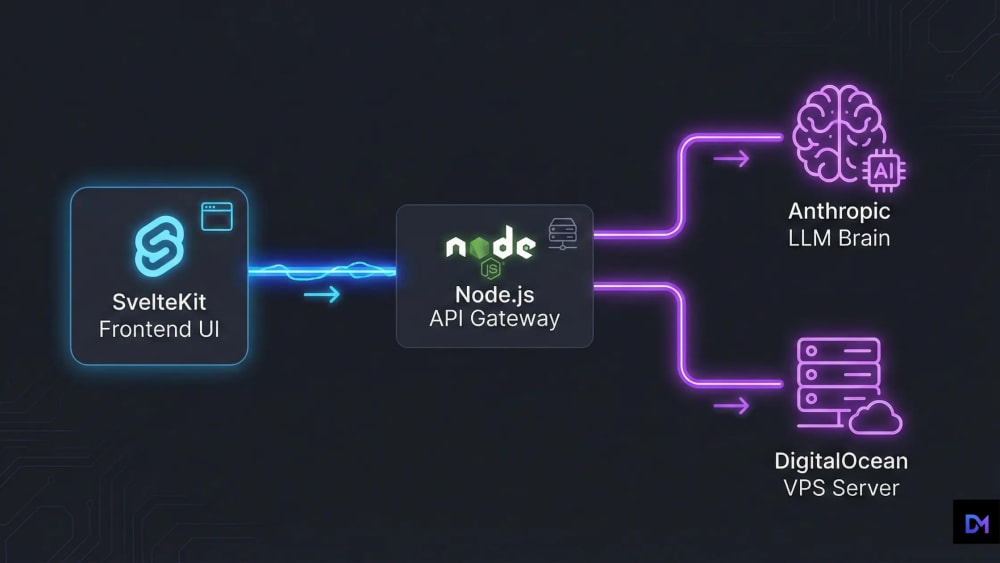
Over the past year, I have focused heavily on architecting these custom AI applications. The secret to a successful AI SaaS isn't burning millions to train a model; it’s about seamless architecture, rapid streaming, and cost-effective deployment. Today, I’m breaking down the exact SvelteKit and Node.js stack I use to launch production-ready AI tools over a single weekend.
The 2026 AI SaaS Tech Stack
- Frontend: SvelteKit. When streaming real-time tokens, reactivity is everything. As I noted in my SvelteKit vs Next.js 16 Benchmarks, Svelte’s lightweight stores handle high-frequency UI updates much better than React.
- Backend: Node.js (Express). I use a lightweight Node server as a proxy. Never call AI APIs directly from the browser; keeping your API keys on the server is the only way to stay secure.
- The Brains: Claude 4. For complex logic, Anthropic’s latest models are currently my top choice. After running several tests for my Claude vs Gemini Benchmarks, I’ve found that Claude 4 handles structured JSON outputs with much higher reliability.
Streaming the AI Response (Backend Implementation)
The biggest UX mistake I see is making users wait for a full response. You must stream tokens. Here is the Node.js implementation I use to keep the interface snappy:
// server.js (Node.js API Route for AI Streaming)
import Anthropic from '@anthropic-ai/sdk';
import express from 'express';

const app = express();
const anthropic = new Anthropic({ apiKey: process.env.ANTHROPIC_KEY });

app.post('/api/generate', async (req, res) => {
  const { prompt } = req.body;

  res.setHeader('Content-Type', 'text/event-stream');
  res.setHeader('Cache-Control', 'no-cache');

  const stream = await anthropic.messages.create({
    max_tokens: 1024,
    messages: [{ role: 'user', content: prompt }],
    model: 'claude-4-latest',
    stream: true,
  });

  for await (const chunk of stream) {
    if (chunk.type === 'content_block_delta') {
      res.write(`data: ${chunk.delta.text}\n\n`);
    }
  }
  res.end();
});
Ownership: Database and Auth
Saving chat history and managing users is where most developers get stuck. I prefer keeping full control over data. Instead of expensive managed services, I use a self-hosted approach. As I mentioned in my PocketBase guide, running your own database alongside your Node server is much more cost-effective.
Monetization: Stripe Webhooks
For payments, I always stick with Stripe. I set up a secure endpoint in my Node.js backend to listen for webhooks. When a payment is successful, the server updates the PostgreSQL database and instantly unlocks features on the SvelteKit frontend. Keeping billing logic off the client-side is crucial for security.
Deployment: The DigitalOcean Way
Deploying an AI SaaS on serverless platforms can lead to timeouts and high bills. I’ve found that containerizing the app with Docker and hosting it on a VPS is the most reliable method.
My Infrastructure Setup:
I host my AI tools on DigitalOcean Droplets. It gives me root access, predictable monthly costs, and no limits on long-running streaming connections.
Start Your Project on DigitalOceanFinal Thoughts
Building an AI prototype is simple, but scaling it securely with proper billing and database management is where the real work happens. By using SvelteKit for the frontend and a solid Node.js proxy, you can build something truly profitable. What specific AI tool are you planning to build next?